Simple, Compliant Nutrition & Allergen Labelling
Still relying on spreadsheets to manage nutrition and allergen labelling? As recipes change, keeping labels accurate and compliant becomes more complex and prone to costly errors.
TraceGains NutriCalc gives established food manufacturers instant access to accurate, compliant nutrition / recipe information in UK/EU & international formats – so you can create labels with confidence, reduce risk, and even save £10,000 annually on average, compared to using lab analysis.†
Ensure compliance, minimise risk, and reduce complexity.
" It's quick and easy for us to generate the nutrition information. We love the ability to add ingredients such as seasoning, QUID the ingredients and highlight any allergens, so we're generating everything we need from the software to put on our labelling. "
– Grants of Speyside – Award-Winning Traditional Scottish Meat Products Supplier for Nearly 200 Years
Nutrition Labelling Right First Time, Every Time
If you’ve already developed your recipes (or even if you haven’t and so also need an NPD solution), NutriCalc lets you take full control of your food product labelling needs – providing instant, highly accurate nutrition information in various legislation-compliant label formats and reports.
During product pre-launch, or any of the critical stages along the way, NutriCalc helps you save time, effort & money, to get products to launch faster.
Why Use NutriCalc for Labelling

Proven Software You Can Count On
- The trusted, leading nutrition analysis & labelling software - join hundreds of satisfied customers worldwide
- Used by Campden BRI, FDF Scotland, Trading Standards Officers, and Universities
- Millions of recipe labels created - proven software from a highly experienced provider
- Developed by a food scientist - get the best nutrition analysis accuracy
- Vast ingredients database from leading sources - UK/EU (McCance & Widdowson), US (USDA), and NutriCalc supplementary files
- Intelligent auto checks - helps to catch any mistakes or erroneous supplier data
- 30 years of nutrition calculation & labelling experience - get the right answer & quickly, with unrivalled support
- Fast response time - UK-based support team respond same UK business day
- Part of TraceGains & Veralto Group - global leaders providing food 'source to shelf' solutions
Leading Features That Count
- Official UK / EU reports & labels
- Official international reports - North America, Australasia, GCC, Hong Kong, & South Africa*
- Built-in HFSS score calculator - integrated with your recipes data, saving time & hassle*
- Official meat content calculation - ideal for meat and protein product manufacturers*
- Scalable to any size business - add more features & team access as needed
- Telephone support - if you prefer, speak to a person to get help with your query*
- API integration - further streamline work and increase productivity**
- Fixed one-off annual cost - includes unlimited data, recipes, ingredients & reports
*Features are available with our Premium plan. **Available on Annual plans at an additional cost. Full details are on our website’s Worldwide Pricing page.
NO CREDIT CARD REQUIRED
ACCESS PREMIUM PLAN FEATURES‡
Nutrition Calculation, Labelling & Reports-In-One
4 Simple Steps:
1. Enter Recipe Ingredients
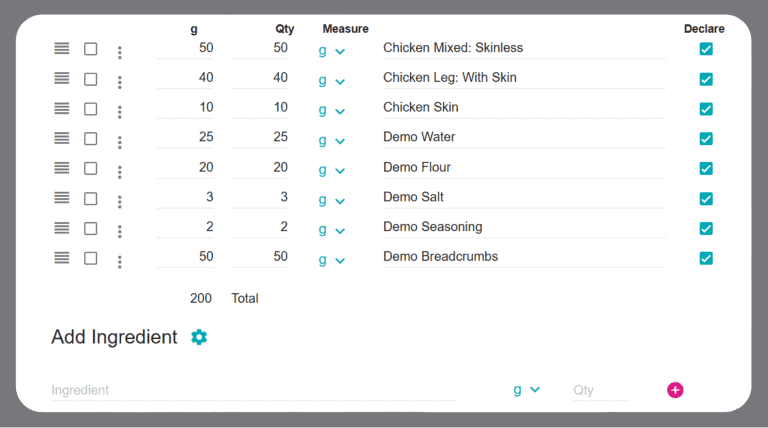
Enter your recipe ingredients and quantities to generate the compulsory macronutrient and voluntary micronutrient information.
Select ingredients from the built-in high quality databases (McCance & Widdowson / USDA / NutriCalc supplementary files).
Or add your own ‘custom ingredients’ by entering specs from suppliers / labels of finished products (which contain multiple ingredients).
Enter the recipe weight after cooking (if the product is cooked).
2. Confirm Any Official Allergens Present
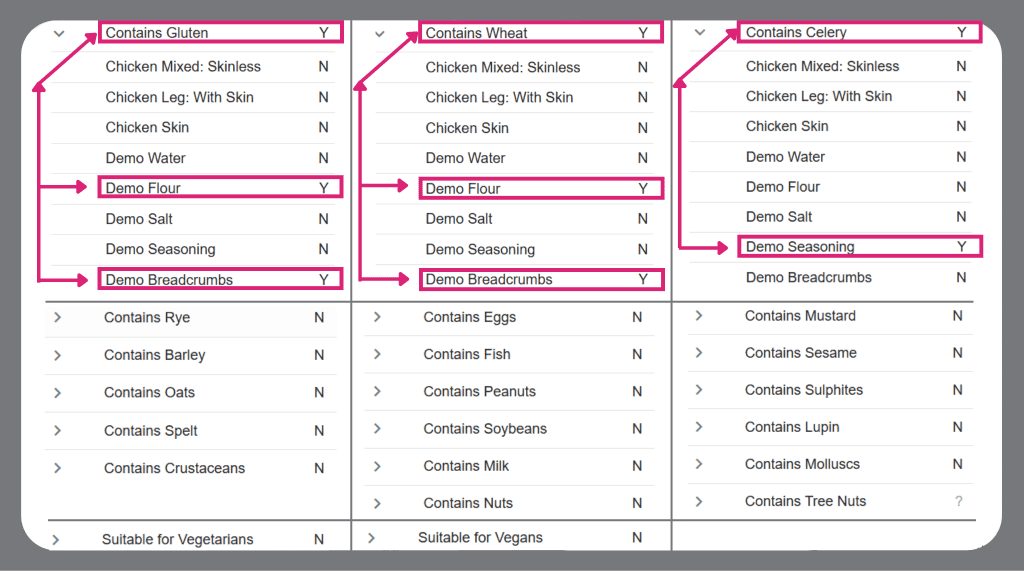
Using the built-in allergens checklist, confirm if each ingredient contains any of the official allergens in the UK/EU, or in other countries of sale – checking for allergens on supplier ingredient specs / labels of finished products.
You can even add custom allergens if any other ingredients are officially recognised as allergens in other countries you’re exporting to.
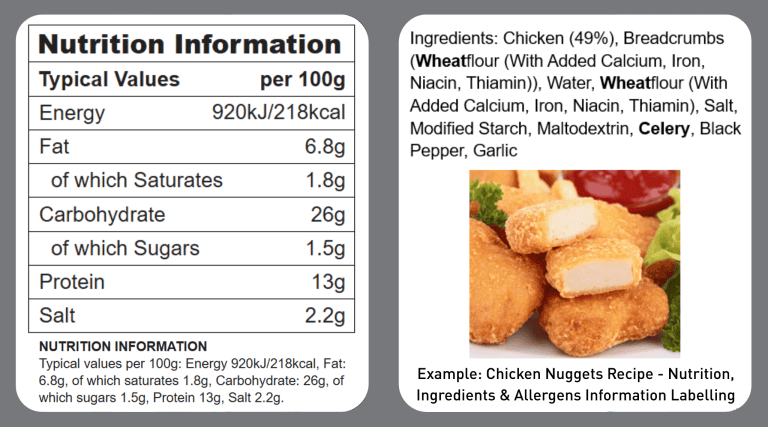
NutriCalc will then automatically embolden the allergen ingredients – e.g. Gluten / Wheat and Celery in this chicken nuggets recipe example – on the ingredients declaration and QUID label (see next image).
3. Create Ingredients List & QUID Ingredients
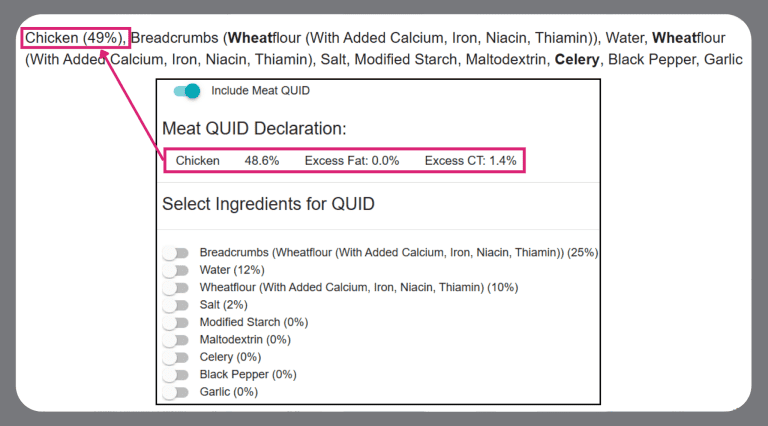
If your recipe features multiple finished product ingredients containing the same sub-ingredients (e.g. milk), your ingredient list can be long due to repeating sub-ingredients. For a shorter, easier to read label, NutriCalc lets you create a custom ingredient list, to list each ingredient only once.
As well as showing all allergen ingredients emboldened, you can add a Precautionary Allergen Statement (PAL) if it’s relevant (e.g. if the recipe ingredients may have been unintentionally exposed to other food allergens).
Select ingredients for QUIDing (if applicable), to declare their % quantity of the recipe for comparisons if they appear in the product name – e.g. Chicken.
4. Output Compliant UK/EU & International Labelling
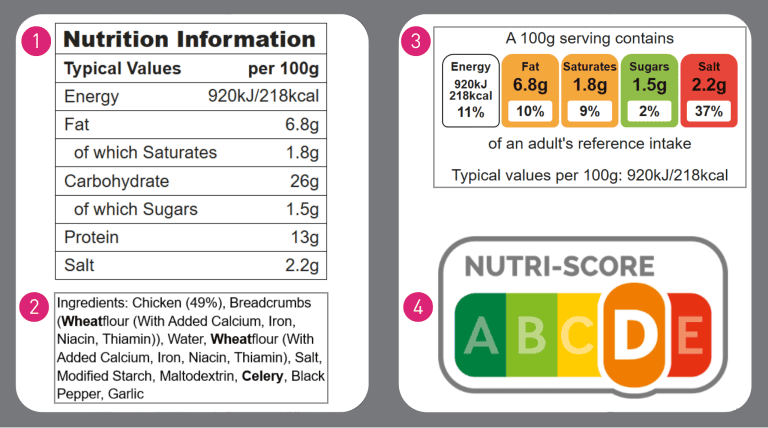
1: (Mandatory) UK/EU Back of Pack Nutrition Information: lists the compulsory macronutrients, plus vitamin/mineral micronutrients (optional).
2: (Mandatory) Ingredient / Allergens List and QUID: lists recipe ingredients / emboldened food allergens, with the QUIDed % of ingredients – e.g. chicken.
3: (Voluntary) UK Front of Pack Nutrition Score: ‘traffic lights’ system indicates if the quantity of each main macronutrient is high, medium, or low.
4: (Voluntary) EU Nutri-Score Nutrition Score: adopted by many EU countries.
More Than Nutrition Software
NutriCalc is part of TraceGains, a global networked ecosystem helping established food manufacturers drive their digital transformation. Product development time is streamlined using a fully integrated, digitised workflow from the initial concept recipe ingredient sources, through to the final artworked and packaged product on the shelf.
TraceGains’ fully connected platform gives businesses visibility of all key data in real time, for faster, more accurate decision-making – helping get products to market quicker.
Three Tasty Plans to Choose From
Our comprehensive Professional plan is suitable for most food manufacturers. Select our Professional Plus or Premium plan if you need the additional features listed below.
Get 1 year’s locked-in access and data backup with our Annual plans, starting from £750.